

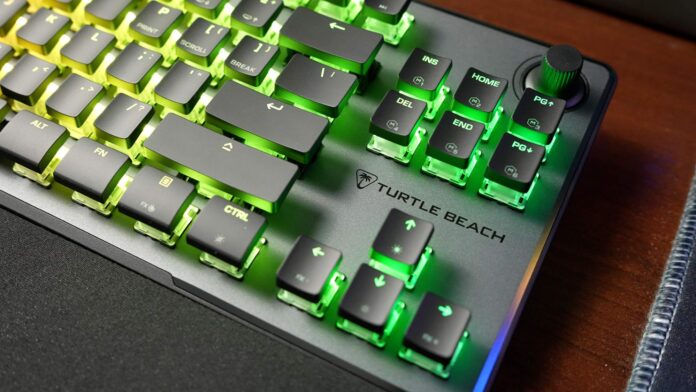
For the past few weeks I’ve been using a new Turtle Beach Vulcan II TKL Pro keyboard (the version with linear Hall Effect switches), connected to my new PC. Switching from my already well-worn, classic “mechanical” keyboard felt like a jump into the future – the old one started jamming and double-registering keystrokes (or not registering them at all), so I was looking for something reliable and fresh. The Vulcan II TKL Pro caught my attention with modern tech (Hall Effect) and the compact TKL format (no numpad) – perfect for a mix of office work and gaming.
I received the review unit directly from the manufacturer. Thank you for supporting my channels and blog.
Specifications and features
On paper, the Vulcan II TKL Pro is genuinely impressive. It’s a tenkeyless keyboard (without the numeric section) with a detachable USB-C cable (to USB-A, length 1.8 m). It has per-key RGB backlighting in the AIMO system (illuminated keys and lighting effects). The key differentiator is the magnetic Hall Effect switches (linear) – in practice they work like analog switches, completely without fixed contacts. The manufacturer claims a lifespan of up to 150 million keystrokes. Each key has an adjustable actuation point from 0.1 to 4.0 mm – you can shorten or lengthen it to your preference. The standard polling rate is 1000 Hz (reporting every 1 ms), and the keyboard supports full NKRO (N-key rollover) and anti-ghosting.
The keyboard also has built-in 8 MB memory for 5 profiles (lighting, macros, etc.), and a volume knob with a mute function (push-to-mute) in the top right corner. On top of that there’s Easy-Shift [+], which lets you assign a second function to every compatible key (duplicated functions when you hold a dedicated modifier key).
The case is very solid – it has an anodized aluminum top plate, and the whole thing weighs about 633 g, so under pressure I didn’t notice any flex in the construction. The keyboard sits steadily on the desk thanks to anti-slip feet and two levels of flip-out feet (two tilt angles). In the box you also get a wrist rest made of soft foam – not particularly elegant, but it effectively reduces wrist strain during longer typing sessions (note: it collects dust easily and after a month turns slightly gray).
The keycaps on this keyboard are flat and very low-profile – you can clearly see the transparent switch housings underneath, which diffuse the RGB light really well. The layout is ANSI (standard QWERTY) with 84 keys (three buttons between the main section and the knob are removed and their functions are hidden in the Fn layer). Overall it looks very modern and clean. The metal surface looks neat and tidy.
Typing and gaming – differences versus the classic feel
The switch from traditional switches (like Cherry MX Blue/Red) to modern Hall Effect is noticeable immediately. First, the lightness. The Gateron KS-20 White (Hall Effect) switches require very little force to actuate (about 30 g). My fingers barely brushed the keys and they already registered a press. At first it was surprising: my old mechanical had an actuation point closer to 2-3 mm, while here the keys worked by default at about 1.2 mm of travel. That sometimes resulted in accidental double presses, so I quickly raised the actuation point to about 1.5 mm. The good news is you can change it instantly, either with key combos on the keyboard itself or in the Swarm II software. After that adjustment, typing is very smooth and faster for me than before, because you hardly need to press with force and every finger movement turns into a character on screen.
There’s also a noticeable difference in sound. Unlike my old keyboard, the Vulcan II doesn’t thunder with plasticky clatter on every hit – the sound is drier, a mid-to-high “click,” and overall fairly muted. For people working at night, that can be a big advantage – the keyboard lets you know a key was pressed, but it doesn’t wake up the whole apartment.
When it comes to responsiveness, it’s a huge improvement. Hall Effect switches are contactless, so in theory they don’t wear out and they keep a stable actuation point over a long time. Add to that a very short reset between presses (Swarm II offers Rapid Trigger, so a key can register multiple presses before it returns fully to the top). In games you really feel it – even in fast FPS titles, basic actions (sprint, jump, shoot) happen instantly, with no delay. No ghosting and NKRO ensure I can press several keys at once (like WASD+Shift+Space) and everything registers correctly.
For usability, it’s worth mentioning the extra functions: the Fn key on the Vulcan II TKL Pro does a lot of work. Fn+F1-F4 switches profiles, Fn+F5-F7 are shortcuts (open Swarm II, open File Explorer, screenshot), Fn+F8 records a macro, and Fn+F9-F12 control media (previous, pause, next). On top of that, under the volume knob you get 6 programmable macro buttons that are activated through Fn. You can also enable Game Mode (locks the Windows key) or alternative Easy-Shift [+] functions. In short, the whole keyboard can take on a lot of additional roles (app control, office shortcuts, macros), which I appreciated both for work and gaming.
Software and customization
The Vulcan II TKL Pro uses Swarm II software for configuration. The interface is pleasantly modern and easy to read. Right after connecting, you can see all connected devices and manage profiles. The most interesting part is the “Analog Function” panel – that’s where you discover the power of Hall Effect. In the first section (Primary/Fn) you can globally set the actuation point for all keys, and then in the Game Mode and Easy Shift tabs you can set it individually per key. This is also where you enable Rapid Trigger, Multi-Input, and Controller Emulator. Rapid Trigger allows ultra-fast repeated actuation without the key fully resetting, which speeds up movement in games. Multi-Input is like analog control – depending on how deep you press a key, you can trigger different actions (for example a light press = sprint, a full press = sprint plus jump). Controller Emulator lets you map keys to analog axes (for example simulating a directional joystick or a gas pedal).
All of this sounds great, but in practice it’s mixed. The software definitely has a lot of options and capabilities (macros, AIMO lighting effects, Easy-Shift settings, and so on), but unfortunately in the version I tested there were minor bugs. Sometimes after making changes, profiles wouldn’t remember actuation points and I had to redo it a few times. I also noticed typos and rough tooltips. It’s nothing critical – the manufacturer promises frequent updates – but it’s worth keeping in mind. Thankfully, basic configuration (switching profiles, assigning macros or RGB effects) is quick and mostly trouble-free. For me the most important thing was being able to assign different lighting zones to secondary functions (so-called Smart Key) and program macros, and in that task Swarm II is more than sufficient.
Who it’s for and whether it’s worth switching
After a month of use, I can say the Vulcan II TKL Pro makes up for the learning curve with quieter and faster key operation. It sits at the top tier of gear for gamers and power users. If you’re a tech enthusiast and you like tailoring hardware to your needs, these new options (analog-style keys, adjustable actuation, instant response) are genuinely satisfying. It works well both in dynamic FPS games (where every millisecond matters) and during long sessions of typing emails or coding (low actuation force reduces fatigue).
That said, potential buyers should know it’s not the most budget-friendly option. A price around 150 USD means mid-range competitors can offer optical-mechanical keyboards or solid mechanical boards. But if your old keyboard is starting to grind the way mine did – jamming or duplicating letters – the switch quickly feels like a relief. For the money, you get a special-purpose tool: strong build quality (aluminum frame, stable construction, included wrist rest) and future-facing solutions (Hall Effect).
Downsides? If you don’t need all the bells and whistles – for example you use a keyboard only for typing or you just want something quiet and simple – you can find cheaper options. It also lacks hot-swappable switches (it’s not hot-swappable) and better keycaps (ABS isn’t as durable as PBT). If those factors don’t bother you, and you want a modern, fast keyboard, the Vulcan II TKL Pro will be an excellent choice.

